The complete article
RSSnook fetches and stores full text with each story, so truncated feeds become a calm reading view instead of a trail of tabs.
A private, self-hosted RSS reader that brings the full article, your own organization, and local AI digests into one calm reading space. No cloud account, tracking, or hidden ranking.
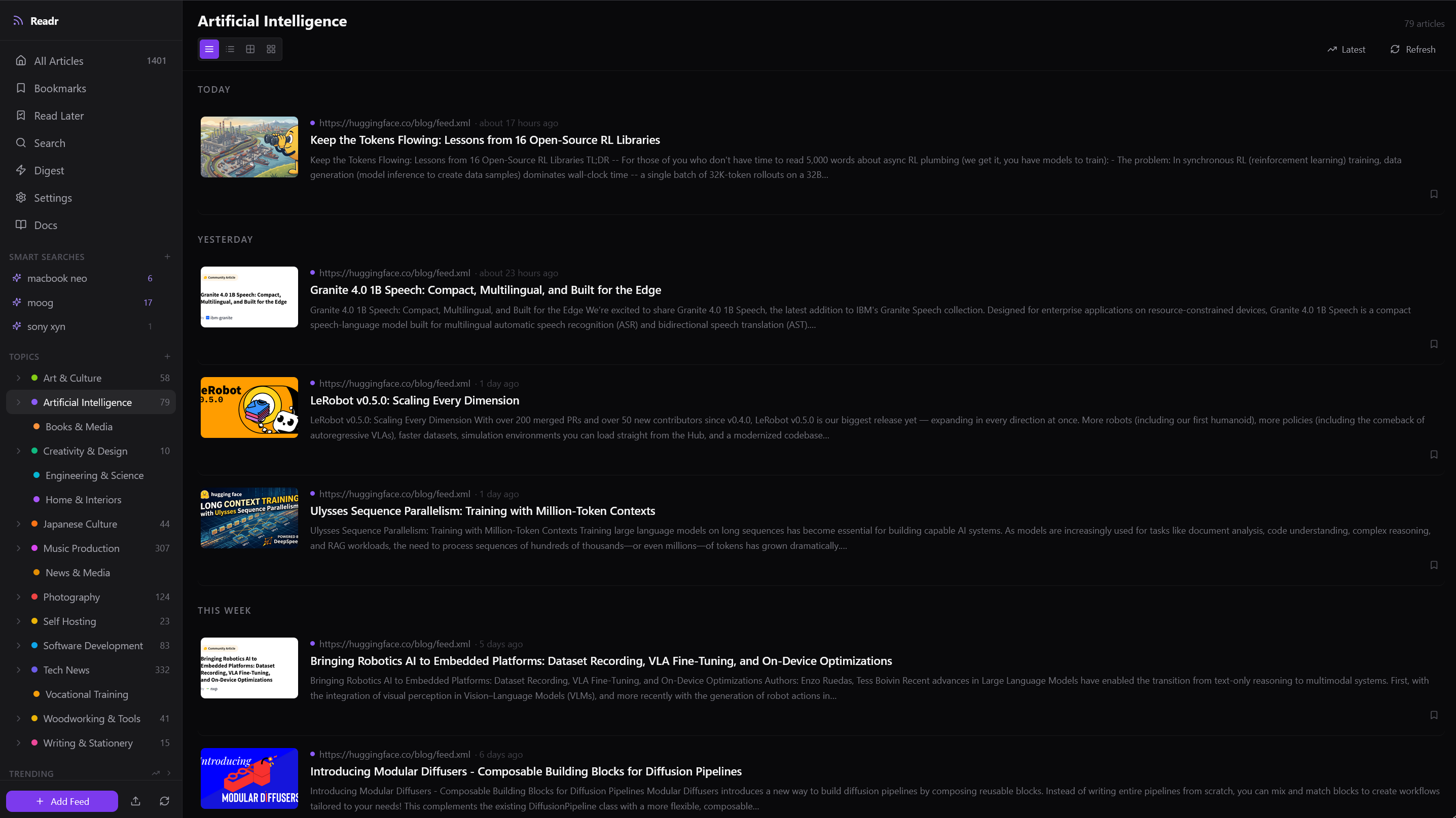
01 One inbox for the open web, ordered on your terms.
The reader, reclaimed
RSSnook is built for choosing sources deliberately, finishing what is worth reading, and letting the rest go. It replaces the endless refresh with a library you can actually organize.
RSSnook fetches and stores full text with each story, so truncated feeds become a calm reading view instead of a trail of tabs.
Put one feed in several topics, save searches, add colour-coded tags, and keep bookmarks separate from the read-later queue.
Stories arrive from sources you chose. Browse by topic, feed, date, or search without a platform quietly rewriting the order.
One reading surface
Move from a broad daily scan to one topic, one saved search, or one full article without leaving the app.
A design feed can live in both “Art & Culture” and “Creativity & Design.” Organize by how you think, not by a rigid folder tree.
Open a Reddit post with its live threaded comments, scores, and context instead of flattening it into a headline.
Bookmark a reference, send something to read later, or highlight a passage and attach a private note.
Local intelligence
Ollama runs the language model on your machine. Your subscriptions, reading history, and prompts do not need to become somebody else's training data to make the pile manageable.
At a time you choose, Ollama summarizes the last 24 hours topic by topic.
Ask for the short version of one article and keep the result cached locally.
Extract people, organizations, places, and subjects to see what is trending across your feeds.
Sunday · 19 July
Open-source model releases moved toward smaller edge deployments, while new training work focused on longer contexts and reusable robotics datasets.
Two new camera firmware releases and a practical field review are worth a closer look.
Generated locally Ollama · Qwen
Less maintenance, less noise
Rules run as articles arrive. They do the repetitive sorting without deciding what you are allowed to see.
WHEN
THEN
Auto-tag, bookmark, or mute new articles when a feed or title matches your rule.
Save a full-text query and let matching articles collect themselves.
Drop recurring noise by plain text or regular expression, globally or one feed at a time.
Use thumbs up and down to tune a personal priority score without exporting that feedback.
Private by location
The application, database, extracted articles, and model all run in your Docker stack. There is no RSSnook account and no remote storage service to keep in sync.
Built for a private network. RSSnook intentionally has no login screen. Keep it on your LAN or behind Tailscale; do not expose its port to the public internet.
Open, ordinary pieces
MIT-licensed source, plain Docker Compose, and a single SQLite file for your data.
Good to know
RSSnook is opinionated, self-hosted software for one person—not a hosted feed service.
RSSnook is a free, open-source, self-hosted RSS and Atom reader for one person. It fetches full articles, organizes feeds into topics, includes Reddit comments, and can create private AI summaries with a local Ollama model.
No. Articles, reading state, bookmarks, tags, searches, highlights, notes, and AI output are stored in your local SQLite database. Local summaries run through Ollama on your own machine.
Often. The included RSSHub service can turn Bluesky, YouTube, and hundreds of other supported sources into feeds. Standard RSS and Atom URLs work directly.
Yes. RSSnook imports and exports OPML. Folder names in an imported OPML file become topics, and bulk URL import can use the local language model to propose topic assignments for review.
No. RSSnook is a single-user application with no authentication layer. Run it on a private network or behind a private access tool such as Tailscale, and do not expose its port directly to the public internet.
Docker Compose is the simplest setup. The stack includes the SvelteKit interface, FastAPI backend, SQLite database, nginx, RSSHub, and Ollama. Ollama can run on CPU, or use a supported NVIDIA GPU when available.
Free · open source · self-hosted
Clone the project, start the Docker stack, and move your subscriptions over with OPML.